Why Cloud Migrations Fail: When Security and Resilience Are an Afterthought
Why Cloud Migrations Fail: When Security and Resilience Are an Afterthought
A workload landing in the cloud is not the same thing as a migration succeeding. I've said some version of that sentence on more projects than I can count, usually to a project sponsor who was ready to declare victory the moment the last server finished replicating.
Over 25+ years — as a Help Desk analyst, an Oracle DBA, a Systems Administrator, and eventually a Cloud Architect leading enterprise migrations for firms like IBM, Deloitte, Capgemini, and Infosys — I've watched teams pour months into discovery, right-sizing, data sequencing, and cost governance, only to treat security and disaster recovery as the paperwork you finish at the end. That order is backwards. Security and resilience aren't the caboose on the migration train — they're structural, and if you get them wrong, everything else you did well becomes irrelevant the first time something breaks.
I led a large-scale data center consolidation for an enterprise client where dozens of production and non-production environments — SAP, custom applications, multiple databases — had to move off aging infrastructure onto a new target platform. The team had already done excellent work: environments were mapped, migration waves were sequenced, cost models were built out. But the question that actually determined the architecture wasn't "how do we move it" — it was "what happens if this fails on the way, or fails after we've cut over." Every design decision after that question — which migration method to use, whether to run parallel environments, how long the cutover window could safely be — flowed from the answer.
That's lesson five, and it's really two lessons stacked on top of each other: security and resilience. They get lumped together in most course outlines because they answer the same underlying question — can this environment be trusted to run the business — but they attack it from different angles. Security asks who can touch the environment and whether that access is being watched. Resilience asks what happens when something goes wrong anyway, because eventually something always does.
Security starts with controlling who can do what
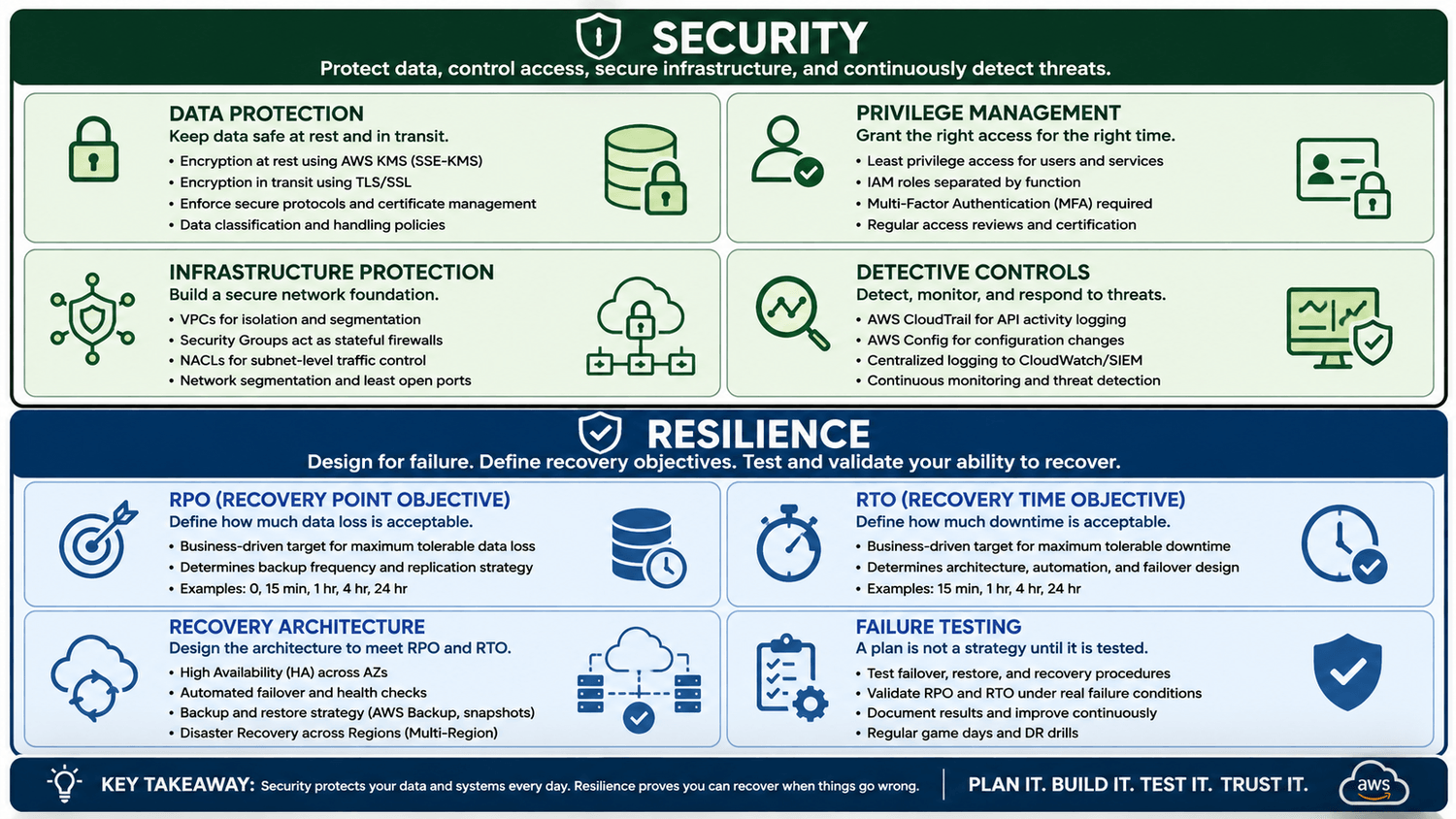
The foundational principle — the one that shows up first in AWS's own Well-Architected security pillar — is least privilege. Grant only the permissions a person or service needs, for only as long as they need them. An administrator who needs to restart a server has no business holding permissions to delete a database. This sounds obvious stated plainly, but in real environments it's violated constantly, usually because it's faster to hand someone broad access than to scope a role correctly. Faster now, expensive later.
Enforcing this properly means separating IAM roles by function — the person deploying infrastructure is not the person managing database access keys — and requiring multi-factor authentication for anyone touching the cloud environment. MFA alone eliminates a huge share of the "compromised credentials" incidents that show up in breach post-mortems.
Access control only matters if you can prove it's working, which is where traceability comes in. Every action — who did what, when, and from where — needs to be logged and, critically, logged in a way that can't be altered after the fact. In AWS environments that means CloudTrail capturing every API call and Config tracking configuration drift over time, feeding into a centralized SIEM for analysis. This isn't bureaucratic box-checking. When a security incident happens — and on a long enough timeline, on a large enough environment, one will — an immutable audit trail is the difference between a contained incident and a forensic nightmare where you can't even establish what happened.
Then there's the data itself, which is what all of this is protecting in the first place. Data has two states — at rest and in transit — and both need encryption. At rest, that means provider-managed or customer-managed keys through something like KMS, so that even physical access to storage media doesn't expose readable data. In transit, it means enforcing TLS/SSL on every connection, whether that traffic is moving between cloud services, out to the internet, or across the client's private network. Layer network segmentation on top — VPCs, security groups, NACLs restricting traffic to only the ports and protocols a workload actually requires — and you've built the kind of defense-in-depth that doesn't rely on any single control holding the line by itself.
Resilience: proving recovery works, not assuming it
Security keeps unauthorized people out. Resilience is about what happens when authorized systems fail anyway — hardware dies, a region has an outage, someone fat-fingers a deployment. Before you migrate a single workload, you need answers to two questions, and they're not technical questions first — they're business questions.
RPO — Recovery Point Objective: how much data can this application afford to lose if something fails right now? Five minutes of transaction data? Zero?
RTO — Recovery Time Objective: how long can this application be down before it costs the business real money or real trust?
I ask these questions in almost every discovery engagement, and I've learned to distrust the first answer I get. Business stakeholders often say "zero downtime, zero data loss" reflexively, without weighing what that actually costs to build and maintain. Part of the job is translating "we can't have downtime" into an honest conversation about tiering — which applications genuinely need multi-region failover and near-zero RPO, and which ones can tolerate a standard backup-and-restore posture at a fraction of the cost. Not every workload deserves the same disaster recovery architecture, and treating them all identically either wastes budget or under-protects something critical.
Once those answers exist, they dictate the architecture — high availability, automated failover, backup cadence, or a full multi-region DR posture depending on how aggressive the requirements are. Purpose-built tools for this exist for a reason: platforms designed around continuous data protection and journaling can achieve dramatically lower RPOs and RTOs than a standard backup schedule, letting you roll back to a point in time just before a failure rather than restoring from last night's snapshot.
But here's the part almost everyone skips: testing the failover, not just configuring it. I can't count how many environments I've walked into where disaster recovery existed entirely on paper — documented, diagrammed, presumably functional — and had never actually been triggered. A DR plan that's never been tested isn't a DR plan. It's a hypothesis. The only way to know your environment can recover is to force it to, on a schedule, before you need it to for real.
Automate it, or it won't scale
None of this holds up if it depends on people remembering to do it manually. Cloud environments change too fast for that. The teams that get security right treat it as automated policy, not periodic review — rules that flag or auto-remediate an unencrypted storage bucket the moment it's created, continuous threat detection tools that use anomaly analysis to catch unusual login patterns or traffic spikes before they become incidents, and infrastructure defined as code so that security configuration is version-controlled, auditable, and consistent instead of drifting environment by environment. Automation is what turns security from a compliance exercise into something that actually scales with the business.
I've seen the alternative play out more than once: a security standard exists, everyone agrees with it in the design review, and six months later half the environment has quietly drifted away from it because enforcement depended on someone manually checking. Nobody drifted on purpose. It just happens when compliance is a checklist instead of a control. Baking the rule into the platform — so an out-of-policy resource gets flagged or corrected automatically — removes the dependency on memory and goodwill entirely. That's the difference between a security posture that holds up under audit two years later and one that only looked good on the day it was signed off.
Why this gets skipped, and why it shouldn't
If I'm honest about why security and resilience end up as an afterthought so often, it's rarely because teams don't understand the concepts. It's sequencing and budget pressure. By the time a migration project reaches the design phase, there's already momentum around a target date, a cost model that's been presented to leadership, and a natural instinct to treat "secure it properly" and "recover from failure" as hardening work that happens after the environment is live. That instinct is understandable. It's also exactly backwards, because retrofitting security and DR onto a live production environment is slower, more expensive, and riskier than designing it in from the start — you're now making changes to something the business depends on, instead of something that's still being built.
Bringing the whole series together
If you've followed this series from the start, lesson five is really the point where everything connects, because these were never five separate problems:
Discovery and dependencies — know what you have, how it performs, and what it connects to.
Lift-and-shift isn't a strategy — right-size and optimize before you move, or you just relocate yesterday's waste into a more expensive zip code.
Data and integration — applications, databases, APIs, and business transactions have to move in the right sequence, or you break things that were working.
Cost and governance — establish accountability and control consumption after the migration is done, not just during the project.
Security and resilience — protect access, protect the data, define recovery requirements, and prove — through actual testing — that failover works.
Assess first, migrate second. That's the pattern underneath the entire series, and it's the pattern I've applied on every real migration I've led, because a successful cloud migration was never measured by how many servers moved. It's measured by whether you built something the business can actually depend on — the day after cutover, and every day after that.
We modernize without compromise.
Continue With Modernize Without Compromise
Explore my latest cloud architecture videos, articles, resources, courses, and more—all in one place.
Explore Modernize Without Compromise →
SHARE